
- > How to Get and Use Marathon Prestige Key
- > Marathon Game Beginner Tips – 15 Essential Strategies to Survive and Profit
- > WARDOGS Season 2 Weapons Tier List: Every Gun Ranked After the Nerf
- > FFXIV FFXV Crossover Event Returns September 24th, 2026
- > PoE 2 1.0 Full Release: Everything You Need to Know About the Launch
- > Grow a Garden 2 Star Fruit Guide: Price, Glow Mutation, Best Setup, and Is It Worth It?
How to Change Name on Marathon Game (Step by Step Guide)
If you logged into Marathon and suddenly noticed your username showing up as “Redacted”, you’re not alone. During the Server Slam testing period, a bug caused many players’ Bungie Names to be automatically replaced. The good news is that Bungie fixed the issue, and most players can now change their name directly through their Bungie account settings.
As someone who has spent years playing Bungie games—from Destiny 2 raids to testing Marathon’s early builds—I can tell you that the naming system works the same way across Bungie titles. Your Bungie Name is your global identity, which means changing it will also change your name inside Marathon.
In this guide, I’ll walk you through how to change name on Marathon game, explain the Redacted name bug, and show you what to do if your name change token has already been used.
Understanding How Names Work in Marathon
Before jumping into the steps, it helps to understand how the system works.
Marathon doesn’t have a separate in game username system. Instead, it uses your Bungie Name, the same identity used across Bungie services.
Your Bungie Name consists of:
-
Your chosen name
-
A hashtag followed by four numbers
-
Example format: PlayerName1234
Those four digits are automatically assigned and cannot be edited. They exist to ensure unique IDs for crossplay across platforms like Steam, PlayStation, and Xbox.
So if you’re wondering how to change your Marathon name, what you’re actually doing is changing your Bungie Name.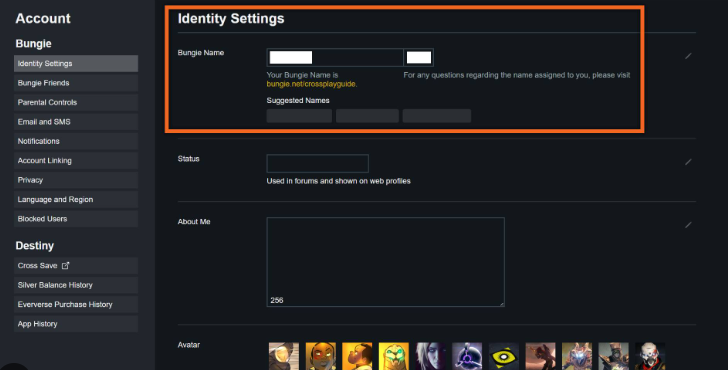
How to Change Name on Marathon Game
If your name became Redacted or you simply want a new identity, follow these steps carefully.
Step 1: Log Into Your Bungie Account
Go to the official Bungie website and sign in using the platform you play Marathon on.
You can log in using:
-
Steam
-
PlayStation
-
Xbox
-
Epic Games
-
Twitch linked accounts
Make sure you use the same account connected to Marathon.
Step 2: Open Your Account Settings
Once logged in:
-
Click your profile icon in the top right corner
-
Select Settings
This opens your main Bungie account configuration panel.
Step 3: Go to Identity Settings
On the left side menu:
-
Find Account Settings
-
Click Identity Settings
This section controls your Bungie Name and how it appears in games.
Step 4: Enter Your New Name
At the top of the page, you’ll see a text field labeled Bungie Name.
Type the name you want to use in Marathon.
Important things to know:
-
Bungie automatically adds # and four numbers
-
Those numbers cannot be changed
-
The name must follow Bungie’s content rules
For example:
PlayerRunner#4821
Step 5: Save Your Settings
Once you're happy with the name:
Click Save Settings.
Your Marathon username will update automatically because the game pulls identity data directly from Bungie’s servers.
Important: Name Changes Are Limited
Here’s the catch many players don’t realize.
Bungie usually gives only one name change token.
That means once you change your Bungie Name, you typically cannot change it again unless Bungie grants additional tokens later.
Because of this, I strongly recommend thinking carefully before saving your new name. Many players rushed through this step and regretted their choice later.
Why Your Name Appears as “Redacted”
During the Marathon Server Slam event, Bungie introduced automated moderation filters.
In some cases, these filters mistakenly flagged legitimate names and replaced them with:
Redacted1234
This happened to a lot of players during early tests, even if their name followed the rules.
The bug has since been fixed, but some accounts still need manual updates.
How to Submit a Marathon Name Change Appeal
If you are stuck with Redacted and cannot change it manually, you can submit a support request.
Here is how to do it.
Step 1: Visit Bungie Help
Go to the Bungie support page and log in.
Step 2: Open the Appeal Form
Navigate to the ban appeal or restriction appeal section.
Step 3: Select the Correct Appeal Type
In the dropdown menu choose:
Bungie Name was changed
This tells the support team you are appealing an automatic name moderation action.
Step 4: Submit the Request
Fill out the rest of the form honestly and explain:
-
Your original name
-
That it was changed to Redacted
-
That you would like your Bungie Name restored
Then submit the request and wait for Bungie to review it.
Support responses usually take a few days depending on request volume.
Tips for Choosing a Good Marathon Name
If you’re changing your name anyway, this is a great time to create something memorable.
Here are some tips from someone who has been naming characters in online games for years.
Choose something easy to recognize
Avoid complicated spelling
Keep it unique but readable
Avoid anything offensive or questionable
Bungie’s moderation system is strict, so names that might seem harmless can still get flagged.
Safe and creative names are always the best option.
Why Your Bungie Name Matters in Marathon
Unlike traditional shooters, Marathon is designed as a PvPvE extraction game. Your identity matters more than you might think.
When you successfully extract with rare gear, players remember your name. Over time, recognizable names build reputation in the community.
Whether you're dominating fights, completing contracts, or trading gear, your name becomes part of your reputation.
Some players even coordinate squad strategies and item farming runs. If you're trying to speed up progression, some players look for reliable marketplaces offering marathon items when resources are limited. Platforms like G4mmo sometimes come up in those discussions.
Just remember that the most satisfying way to earn your gear is still surviving those brutal extractions.
Final Thoughts
Changing your name in Marathon is straightforward once you know where to look. Since the game uses the Bungie identity system, the process simply involves updating your Bungie Name on Bungie.net.
Quick recap:
Log into Bungie.net
Open Settings
Go to Identity Settings
Enter your new Bungie Name
Save your changes
If you were affected by the Redacted bug and cannot change it yourself, submitting a Bungie Help appeal is the next step.
Marathon is shaping up to be one of Bungie’s most ambitious multiplayer experiences, and having the right name attached to your runner is part of building your identity in the game’s dangerous extraction zones.
Choose wisely, because once that name is set, it might be sticking with you for a long time.
Recommended Article


 Email
Email Discord