
- > Path of Exile 2 Return of the Ancients Tangmazu Boss Guide
- > Path of Exile 2 Return of the Ancients Keepers of the Flame Quest Guide
- > Path of Exile 2 Kalguuran Skill Gems List: Where to Find and How to Activate the Newest Kalguuran Remnant Abilities
- > Path of Exile 2 0.5.0 Arbiter of Divinity Pinnacle Boss Guide
- > Path of Exile 2 Return of the Ancients Martial Artist Build
- > Path of Exile 2 Return of the Ancients 0.5.0 Huntress Spirit Walker Build Guide
Path of Exile 2 Item Filters: A Complete Guide
Path of Exile 2 is known for its massive loot system, which can be overwhelming without the right item filter. If you have played the game for any amount of time, you know that your screen can quickly fill up with useless junk, making it difficult to spot the valuable drops hidden in the chaos.
This is where PoE 2 item filters come in. With proper customization, you can highlight important gear, hide worthless items, and optimize your loot efficiency, making your gameplay smoother and more rewarding.
This guide covers everything you need to know about Path of Exile 2 item filters, including why they are essential, how to install them, the best filters to use, and how to customize them to fit your playstyle.
Why You Need an Item Filter in Path of Exile 2
Without an item filter, the sheer amount of loot that drops in PoE 2 can make it nearly impossible to spot the items you actually need.
Here’s why item filters are a must-have:
- Remove Clutter – Filters hide low-value items, preventing your screen from being filled with junk.
- Highlight Important Items – Rare items, valuable currencies, and specific gear pieces stand out with custom colors and sounds.
- Improve Performance – A cleaner screen means better FPS and smoother gameplay, especially in high-density areas.
- Save Time – You won’t waste time checking every single drop—the filter tells you what’s worth picking up.
For both new players and veterans, using an item filter is an absolute necessity to play Path of Exile 2 efficiently.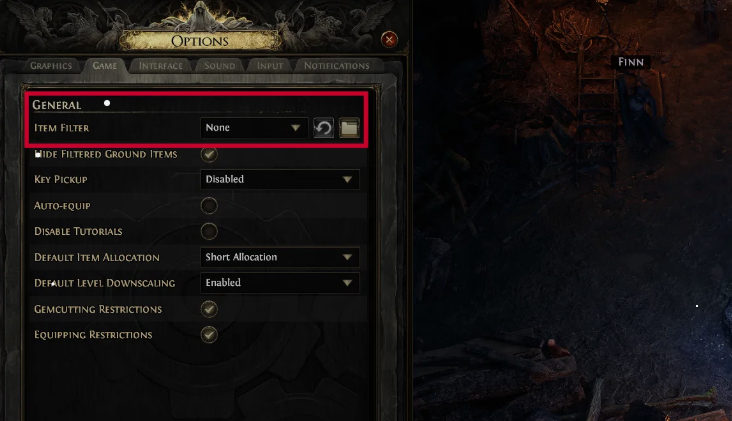
How to Install an Item Filter in PoE 2
Setting up an item filter in Path of Exile 2 is easy and takes only a few minutes.
Step 1: Download an Item Filter
There are several popular item filters available, but the most widely used is NeverSink’s Filter. It is regularly updated and provides a balance between highlighting valuable items and hiding trash.
You can download NeverSink’s Filter from:
FilterBlade – A website that allows you to download and customize NeverSink’s filters.
Step 2: Place the Filter in the Game Folder
Once you download the filter file, you need to move it to the correct location.
- Go to Path of Exile 2’s installation folder.
- Find the "ItemFilters" folder. If it doesn’t exist, create one.
- Place the downloaded filter file inside this folder.
Step 3: Activate the Filter in the Game
- Launch Path of Exile 2.
- Open the Options menu.
- Navigate to Game Settings.
- Scroll to Item Filters and select the filter you just added.
- Apply changes and exit the menu.
Congratulations, your item filter is now active.
For a visual guide on setting up item filters, you might find this video helpful:
Best Item Filters for PoE 2
There are many item filters available, each catering to different playstyles. Here are some of the best ones.
NeverSink’s Filter (Most Popular & Balanced)
- Comes in multiple strictness levels, from Soft (shows more loot) to Ultra-Strict (only highlights the best items).
- Great for both beginners and experienced players.
- Constantly updated for each new league.
Strict Currency Filter (For Farming Currency)
- Hides almost all items except for valuable currency and tradeable items.
- Ideal for players who farm maps and don’t need low-tier gear.
Chaos Recipe Filter (For Bulk Chaos Orb Farming)
- Highlights items that fit into the Chaos Recipe, making it easy to farm Chaos Orbs.
- Great for league start economy farming.
Custom Filters (For Experienced Players)
- Using FilterBlade, you can create a completely personalized filter.
- Adjust color schemes, item highlights, and strictness levels based on your needs.
If you are unsure where to start, NeverSink’s Semi-Strict filter is a great choice for most players.
How to Customize an Item Filter in PoE 2
While pre-made filters work well, customizing your filter can make your gameplay even more efficient.
Step 1: Use FilterBlade
Go to FilterBlade and load a NeverSink filter as a base.
Step 2: Adjust Strictness Levels
Filters can be set from Soft (more loot visible) to Ultra-Strict (only the best items appear).
- Early game: Use Soft or Regular Strictness.
- Mid-game: Switch to Strict or Very Strict.
- Endgame farming: Use Ultra-Strict to focus on only high-value items.
Step 3: Modify Colors & Sounds
- Change the background color of valuable items.
- Add audio cues for extremely rare drops (e.g., Mirror of Kalandra).
Step 4: Test Your Filter in-game
- Save and download your custom filter.
- Place it in the ItemFilters folder and enable it in the game settings.
- Run a few maps and adjust if necessary.
Updating Your Filter for Each League
Every new PoE league introduces balance changes and new items. It’s important to update your filter regularly to:
- Ensure new valuable items are properly highlighted.
- Hide outdated or useless items that may no longer be worth picking up.
- Optimize for new farming strategies in the latest league.
If you use a NeverSink filter, you can simply download the latest version from FilterBlade each league.
Best Practices for Using Item Filters in PoE 2
Using a filter is not just about enabling it and forgetting it. Here are some pro tips.
- Adjust Strictness Based on Playstyle – If you are farming currency, go stricter. If you are leveling, keep it relaxed.
- Use Audio Alerts for Key Drops – Helps you instantly recognize valuable items.
- Hide Items You Don’t Need – If you are in the endgame, there is no reason to pick up low-tier rares.
- Update the Filter Every League – Stay ahead of the economy by filtering out what’s no longer valuable.
- Test the Filter in Different Content – Running maps, delving, and bossing all have different loot priorities.
Final Thoughts on PoE 2 Item Filters
Item filters are one of the most essential tools in Path of Exile 2. Without one, you will waste time sorting through junk, miss valuable drops, and slow down your progression.
By using a good filter, customizing it to your needs, and keeping it updated, you can increase your efficiency and make more currency.
If you are looking to maximize your earnings, G4mmo provides a trusted marketplace for PoE 2 currency, allowing you to trade efficiently and get the best gear without spending hours grinding for every drop.
With the right filter setup, your Path of Exile 2 experience becomes smoother, more rewarding, and less frustrating. No more missing key drops or picking up worthless junk—just pure efficiency.
Now, go forth and loot like a pro, exile.
Recommended Article


 Email
Email Discord