
- > ARC Raiders Search Lockers Trials Guide: Best Maps, Routes, Tips and How to Get 3 Stars Fast
- > How to Get the Canto Blueprint in Arc Raiders
- > How to Get THE FINALS Skin in ARC Raiders
- > How to Complete Battening Down Quest in Arc Raiders
- > How to Get the Frequency Modulation Boxes in ARC Raiders
- > ARC Raiders Crane House Key Guide: Location, Loot, and Best Farming Tips
How to Take a Photo in ARC Raiders
If you have spent more than ten minutes staring at the collapsed motorway with binoculars in ARC Raiders wondering why nothing is happening, you are not alone. A lot of players hit this quest from Shani and assume it works like a screenshot system. It does not. This is one of those mechanics that is simple once you understand it, but confusing until someone explains it properly.
I have been playing extraction shooters and survival games for decades, and ARC Raiders does something here that feels old school in a good way. It does not hold your hand, but it also does not explain itself very well. So let us fix that.
This guide will walk you through how to take a photo in ARC Raiders the right way, explain why the prompt sometimes does not show up, and give you veteran level tips so you can finish these missions without rage quitting.
If you are stuck on the collapsed motorway objective or any other ARC Raiders photo mission, this will get you through it.
What does taking a photo in ARC Raiders actually mean
This is the first thing most players misunderstand.
When a quest says take a photo, it does not mean press a screenshot key. It does not mean open some fancy camera mode. ARC Raiders uses a simple interaction system tied to the binoculars item. You move to a specific trigger zone, look at the target, and press the interact button.
The game then checks three things
You are in the correct location
You are facing the correct target
You have binoculars equipped
If all three are true, the photo is taken instantly and the objective updates.
That is it.
No real camera. No UI overlay. No saved image unless you take your own screenshot for fun.
This system is used for several missions in ARC Raiders, but the collapsed motorway is the one that trips people up the most.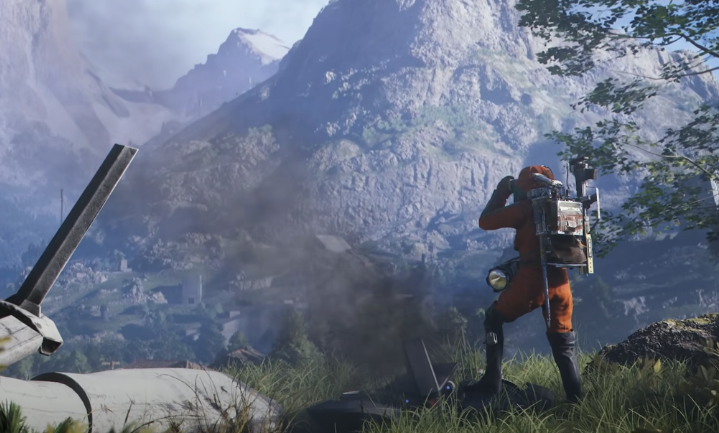
Why the collapsed motorway photo is so confusing
The collapsed motorway area is big, vertical, and full of broken geometry. The red quest marker on your HUD shows a general area, not the exact trigger spot. If you stand in the wrong place, nothing happens even if you are staring straight at the wreckage.
As a veteran player, this reminds me of older RPGs where you had to find the exact interaction pixel. ARC Raiders is more forgiving than that, but it still expects you to be close to the right edge or broken section.
If you are too far away or too low or too high, the prompt will not appear.
This leads to people thinking the quest is bugged, when really they are just not in the correct trigger zone.
How to take a photo in ARC Raiders step by step
Here is the clean, no nonsense way to do it.
First, open your inventory and equip the binoculars. They must be in your active slot. If you have them in your bag but not equipped, the game will not register the interaction.
Next, travel to the quest marker for the collapsed motorway. Use the map and follow the red mission dot.
When you arrive, do not stand at the bottom of the rubble. You need to move close to the broken edge of the highway or the elevated section where the collapse is most visible.
Slowly walk around while looking directly at the destroyed part of the motorway. Keep the binoculars active.
At some point you will see a small interaction prompt appear on screen. On PC it will tell you to press E. On console it will show your interact button.
Press the interact key. You will hear a faint camera click sound. The quest will update immediately.
You have now successfully taken the photo in ARC Raiders.
No screenshot required.
Where exactly is the photo spot
This is what most guides get wrong. They say go to the collapsed motorway, but they do not tell you where to stand.
The trigger is usually near a broken edge or elevated section where the road has fallen away. Think of it like the game wants you to frame the collapse from a specific angle.
If you are standing on flat ground far away, it will not work. You need to be close to the structure, often on a slope or piece of debris.
A good rule is this
If you can see the red mission dot directly on the wreckage, you are probably in the right place
If the dot is floating somewhere behind the rubble or above you, move around until it lines up with the broken motorway.
That is when the prompt usually appears.
Common problems and how to fix them
Even when you know how to take a photo in ARC Raiders, a few things can still trip you up.
The most common issue is forgetting to equip the binoculars. Having them in your inventory is not enough. They must be active.
Another issue is standing just outside the trigger zone. The game is picky about where you stand. Take small steps forward and sideways while keeping your view on the collapsed road.
Sometimes the prompt does not show because you are not facing the correct section. Try adjusting your camera slightly up or down.
In rare cases the mission can glitch. If nothing works, leave the area, move far enough away for it to unload, then come back from a different angle. This usually fixes it.
I have only had to relog once across multiple photo missions, so it is not common.
Why ARC Raiders uses this photo system
From a design perspective, this is actually pretty smart.
ARC Raiders is built around exploration, risk, and extraction. The photo mechanic forces you to slow down and expose yourself in dangerous areas. You cannot just snap a picture from a safe spot and run.
You have to step into the open, line up the target, and interact. In a PvE and PvPvE world, that creates tension.
It also fits the lore. You are documenting the ruins of the world, not taking selfies.
Once you see it this way, it makes a lot more sense.
Veteran tips for photo missions
After doing several of these, here are some tips that will save you time and frustration.
Always clear nearby enemies first. You do not want to be lining up a photo while drones or raiders are walking up on you.
Use cover near the trigger spot so you can duck back if something spawns.
Do not sprint through the area. Walk. The prompt is easy to miss if you are moving too fast.
If you are playing with friends, have one person watch your back while you do the interaction.
These little habits make photo objectives in ARC Raiders feel smooth instead of stressful.
How photo quests fit into progression
Photo missions are not just filler. They usually tie into faction reputation, story progression, and sometimes unique rewards.
Shani in particular uses these tasks to push you into dangerous zones and show you important landmarks.
Completing them unlocks more contracts and better payouts, which matters a lot if you are trying to build up gear and currency. Some players even use the profits from missions like this to fund things like Arc raiders coins purchases from sites like G4mmo, though you only need to go that route if you want to speed things up.
Either way, skipping or failing photo quests slows your overall progression.
How to tell when the photo worked
This part is simple.
When you press the interact key and the photo registers, you will hear a small camera click. The quest text will update instantly. The red marker will disappear or move to the next objective.
If none of that happens, the game did not register the photo. Keep moving until it does.
Do not leave the area until you see the objective update.
Is it the same on console and PC
Yes. The mechanic is identical.
The only difference is the interaction button. On PC it is E by default. On console it will be whatever your interact button is mapped to.
The binoculars requirement and trigger zone work the same across platforms.
Why players think it is bugged
Most frustration comes from one thing
The game does not tell you that the binoculars are required
If you try to do this with just your normal view, nothing happens. There is no error message. No hint. Just silence.
That leads people to mash buttons and assume the quest is broken.
Once you know how to take a photo in ARC Raiders properly, it becomes one of the easiest objectives in the game.
Final thoughts from a veteran raider
ARC Raiders is a game that rewards paying attention. The photo system is a perfect example of that. It is not flashy. It is not obvious. But it works every time if you follow the rules.
Equip your binoculars. Stand in the right spot. Face the target. Press interact.
That is all there is to it.
If you ever get stuck again, remember that the game is not asking you for a screenshot. It is asking you to trigger an interaction.
Once you get that through your head, these missions stop being annoying and start feeling like a natural part of exploring a ruined world.
And honestly, that is what ARC Raiders does best.
Recommended Article


 Email
Email Discord